Payroll template for Nigeria (Excel, 2026 tax rules)
A free Excel payroll template for up to 50 employees that applies the 2026 PAYE rules, pension, NHF and NSITF, with a remittance summary and payslip-ready figures.

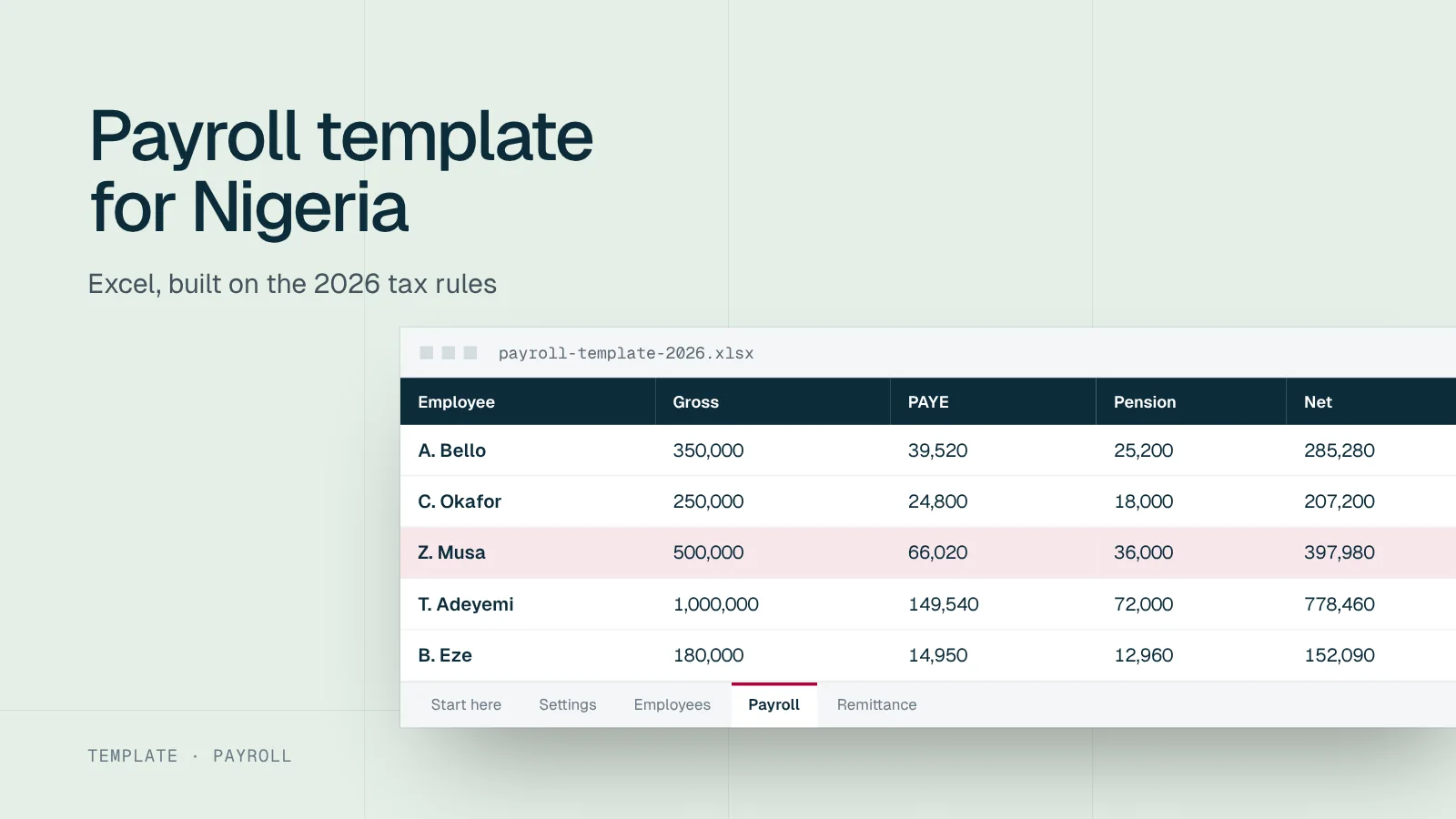
This free Excel workbook runs a monthly payroll for up to 50 employees using the rules that apply from 1 January 2026. It calculates gross pay, PAYE, pension, NHF, NSITF and net pay for each person, and totals what you owe each authority. It is the same logic as our PAYE calculator, laid out so you can check every step.
Five sheets, one payroll
Tap the modules you need.
What the template calculates
For each employee, the Payroll sheet works out:
| Column | How it is calculated |
|---|---|
| Gross pay | Basic + housing + transport + other allowances |
| Employee pension | 8% of basic, housing and transport, if the employee is in the scheme |
| NHF | 2.5% of basic salary, if the employee contributes |
| Rent relief | 20% of annual rent, capped at ₦500,000 |
| Annual taxable income | Annual gross − pension − NHF − rent relief |
| Monthly PAYE | Tax on taxable income across the 2026 bands, ÷ 12; nil at or below the minimum wage |
| Net pay | Gross − PAYE − pension − NHF − other deductions |
| Employer pension | 10% of basic, housing and transport |
| NSITF | 1% of gross pay |
| Employer cost | Gross + employer pension + NSITF |
The PAYE formula applies each band to its own slice of income, the same way the law does. You can see the band arithmetic in the formula bar for any employee.
Check it with a known result
Before you rely on the template, enter one employee on ₦500,000 a month with the default split (₦250,000 basic, ₦125,000 housing, ₦75,000 transport, ₦50,000 other), pension on, NHF off and no rent. The Payroll sheet should show:
Expected results for the test employee
Source: Workstat calculation under the Nigeria Tax Act 2025 rates.
If your figures differ, check the Settings sheet first. Then compare with the step-by-step working in our guide on how to calculate PAYE.
Setting up the workbook
The Settings sheet
Every rate the workbook uses sits here, in one column, with a note of where it comes from:
| Setting | Default | Source |
|---|---|---|
| PAYE bands | 0%, 15%, 18%, 21%, 23%, 25% | Nigeria Tax Act 2025, from 1 January 2026 |
| Band widths | ₦800,000; ₦2,200,000; ₦9,000,000; ₦13,000,000; ₦25,000,000 | Nigeria Tax Act 2025 |
| Rent relief | 20%, capped at ₦500,000 | Nigeria Tax Act 2025 |
| Minimum wage | ₦70,000 a month | National Minimum Wage (Amendment) Act 2024 |
| Employee and employer pension | 8% and 10% | Pension Reform Act 2014 |
| NHF | 2.5% of basic | National Housing Fund Act |
| NSITF | 1% of gross pay | Employees’ Compensation Act 2010 |
Never type a rate directly into a formula on the Payroll sheet. If the law changes, you want one cell to change, not 50.
The Employees sheet
One row per employee: name, staff ID, state of residence for PAYE, basic, housing, transport and other allowances, annual rent for rent relief, and two yes or no columns for pension and NHF. Keep basic, housing and transport separate even if contracts show one consolidated figure; pension depends on them.
The PAYE formula, explained
For anyone who wants to check the arithmetic, the monthly PAYE formula works on annual taxable income (T) and adds the tax on each slice:
| Slice | Excel logic |
|---|---|
| 15% band | MAX(0, MIN(T, 3,000,000) − 800,000) × 15% |
| 18% band | MAX(0, MIN(T, 12,000,000) − 3,000,000) × 18% |
| 21% band | MAX(0, MIN(T, 25,000,000) − 12,000,000) × 21% |
| 23% band | MAX(0, MIN(T, 50,000,000) − 25,000,000) × 23% |
| 25% band | MAX(0, T − 50,000,000) × 25% |
The sum of the five slices, divided by 12, is monthly PAYE. An IF test sets it to nil when monthly gross pay is at or below the minimum wage. In the workbook, each threshold points at a Settings cell rather than a typed number.
How to use it each month
Monthly routine in the template
Update Settings once a year
Check the rates against the latest law before the first payroll of the year
Update Employees
Add starters, mark leavers, change pay and rent details
Enter this month’s variables
Overtime, unpaid days and other deductions in the Payroll sheet
Check the totals
Compare gross, PAYE and net pay with last month and explain big changes
Pay and remit
Pay net salaries, then use the Remittance sheet for PAYE, pension, NHF and NSITF
Save a copy
Save the month as a separate file and protect it
What the template does not do
The template keeps things simple on purpose, so check these cases by hand:
- Mid-month starters and leavers. Enter the pro-rated pay in the Employees sheet for that month.
- Bonuses and arrears. Add them as other allowances in the month you pay them; PAYE recalculates on the higher annual figure, which is a reasonable estimate but not a cumulative calculation.
- Benefits in kind. Cars, accommodation and similar benefits need valuing separately.
- More than one state. The Remittance sheet totals PAYE by the state you enter for each employee, but you file with each state separately.
- Payslips. Use the figures with our payslip generator, or payroll software for the whole team.
Protect the file
The workbook holds salaries and personal details. Store it in a restricted folder, protect it with a password, and do not email it around. Payroll data is personal data under the Nigeria Data Protection Act 2023.
Common spreadsheet payroll mistakes
- CRA left in a formula. The most common error in 2026. Search for “CRA”, “200000” and “20%” in old files.
- Typed numbers in formulas. A rate typed into one row and not another produces different results for identical salaries.
- Broken references after sorting. Sorting one sheet without the other misaligns employees. The template keeps all inputs on the Employees sheet to avoid this.
- Rounding in the wrong place. Round only the final monthly figures, not each slice of tax, or totals drift by a few naira.
- Overwriting last month. Save each month as a new file; the old one is your record.
The Remittance sheet
The Remittance sheet adds up what is due to each authority for the month and shows the deadline next to it: PAYE by state of residence, due by the 10th of the next month; employee and employer pension, due within 7 days of paying salaries; NHF, due within one month of the deduction; and NSITF, due by the end of the month. Use it as your checklist, and record the payment reference next to each line once paid.
When to move to software
A spreadsheet is fine while payroll is small and simple. Consider software when you pass about 20 to 30 employees, have staff in several states, need payslips and approvals for everyone, or find that checking the file takes longer than running it. Our payroll software guide explains what to look for, and the complete payroll guide covers the full monthly cycle.
Run payroll with Paystat
Process payroll with structured, consistent calculations and a full history of every pay cycle.
Sources
Frequently asked questions
Short answers to what employers ask us most about this topic.
Is there a free payroll template for Nigeria?
Yes. This Excel template is free. It calculates gross pay, PAYE under the 2026 rules, employee and employer pension, NHF, NSITF and net pay for up to 50 employees, and summarises remittances.
Does the template work in Google Sheets?
Yes. Upload the file to Google Drive and open it with Google Sheets. The formulas use standard functions that Sheets supports.
Can I change the tax rates?
Yes. All rates, bands and caps are on the Settings sheet. Change them there and every employee row updates.