Staff attendance register template (Excel and PDF)
A free monthly staff attendance register in Excel with codes and automatic totals, plus a printable PDF sign-in sheet, and how to use attendance records fairly in payroll.

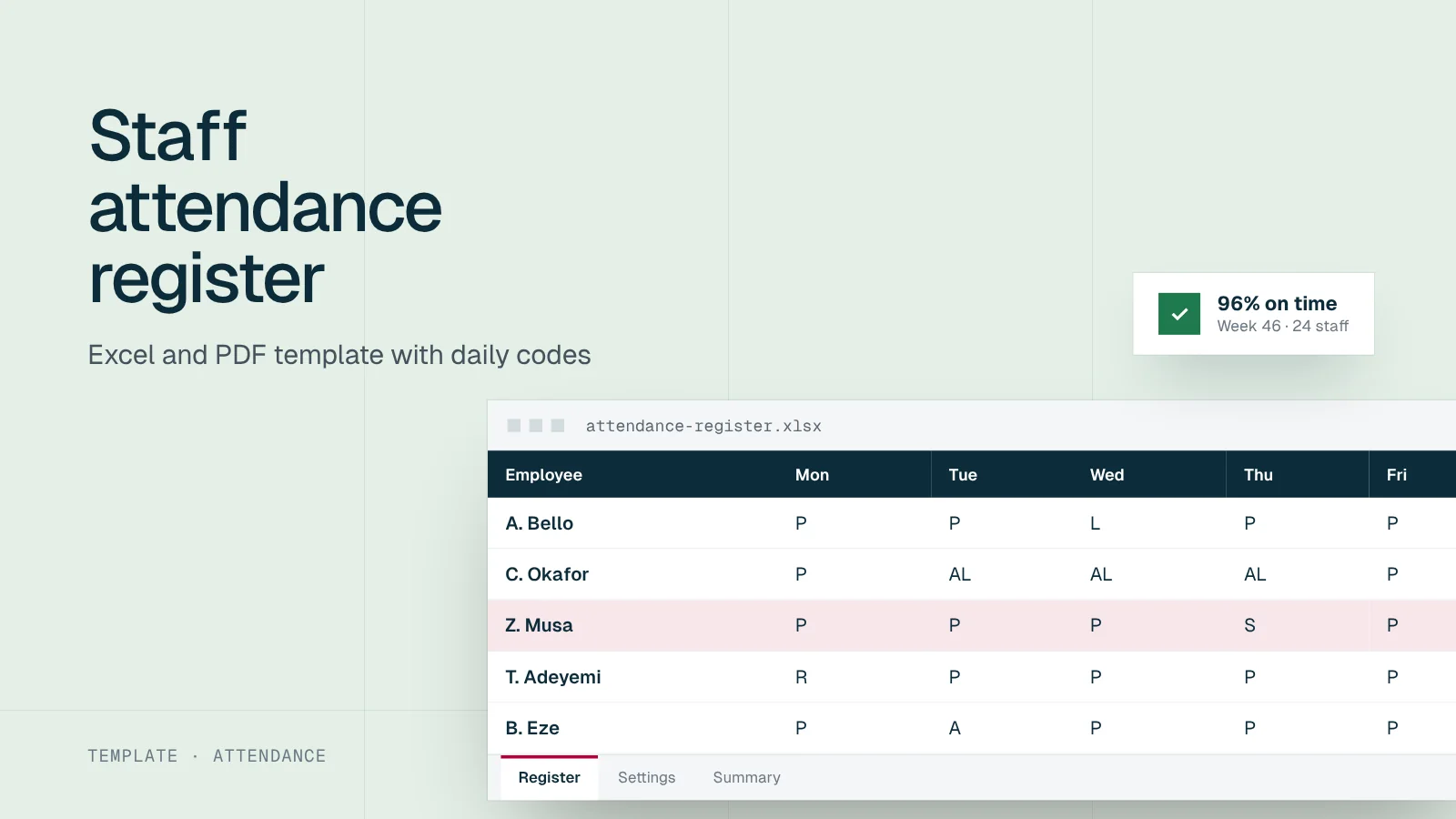
A good attendance register answers three questions without argument: who was at work, who was not, and why. This free template does that for a month at a time. The Excel version totals everything for payroll; the printable sheet works where people sign in at a desk. Both are in the download box.
One code per person, per day
What is in the download
Excel register. One sheet per month with up to 60 staff. Each row is an employee and each column a day. Choose a code from the drop-down list for each day, and the totals at the end of the row count days present, late, absent, on leave, sick and on public holidays. A Summary sheet brings the month’s totals together for payroll.
Printable sign-in sheet. A one-page daily sheet with columns for name, time in, signature, time out and signature. Print one per day, keep them in a file, and enter the codes in Excel at the end of each week.
How to use the register
Setting up and running the register
Set up the month
Enter the month and year on the Settings sheet and list staff on the register
Mark public holidays
Use the declared dates from our public holidays page, and mark them H for everyone
Record each day
Supervisors choose one code per person, the same day
Approve leave first
Mark AL or S only for leave that has been approved or certified
Close the month
Check the totals with each manager and correct errors before payroll
Send to payroll
Use the Summary sheet for unpaid absences, overtime and leave balances
Holidays move each year, especially the Islamic holidays, which are confirmed close to the date. Check our public holidays page before you close each month.
From the register to payroll
Attendance records feed pay in three ways:
| Register entry | What payroll does | What to check first |
|---|---|---|
| A (absent) | Deducts a day’s pay where the contract allows it | The absence was not approved leave or certified sickness |
| Overtime hours | Adds overtime pay | Overtime was approved and the rate comes from the contract |
| AL and S | Reduces leave balances, not pay | Leave was approved; sick days have a certificate where required |
Section 13 of the Labour Act treats hours beyond the agreed normal hours as overtime, so record them separately.
Write down how a day’s pay is calculated, for example monthly pay divided by the working days in that month, and use the same method every time. Our overtime guide explains how to set overtime rates.
Lateness and deductions
The Labour Act restricts deductions from wages for fines, and caps total deductions in a month at one third of wages. A rule that docks pay for every late arrival is risky. Treat persistent lateness as a conduct issue: talk to the employee, then issue a query if it continues. See our query letter samples.
A month for one employee, worked through
This is how the totals at the end of a row look for one employee in a 22-working-day month with one public holiday:
| Code | Days | What it means for pay and leave |
|---|---|---|
| P (present) | 16 | Normal pay |
| L (late) | 2 | Normal pay; counts towards the lateness review |
| AL (annual leave) | 2 | Normal pay; leave balance reduced by 2 |
| S (sick) | 1 | Paid sick leave, certificate on file; sick balance reduced by 1 |
| H (public holiday) | 1 | Normal pay |
| A (absent) | 0 | No unpaid absence this month |
| Total | 22 | Matches the working days in the month |
Two checks catch most errors. First, the codes for working days in each row should add up to the working days in the month. Second, AL and S totals should match the leave records. If either check fails, fix the register before payroll runs.
Using the register for leave balances
The register is often the only place leave is recorded in a small business. Keep a simple running balance for each employee: the annual entitlement from their contract, minus AL days taken each month. Under the Labour Act, staff become entitled to paid annual leave after 12 months’ continuous service, and many employers allow leave to accrue earlier under their policy. Our annual leave guide explains the rules, and the leave policy template sets out how to record them.
Tips for the printable sign-in sheet
- Put the sheet where a supervisor can see it, not in an empty reception.
- Ask people to write the time themselves and sign, then have the supervisor initial the sheet at the start and end of the day.
- Use a pen and draw a line through empty rows at the end of the day so they cannot be filled in later.
- Keep the sheets in date order in one file per month, and copy the codes into Excel each week.
Common problems and fixes
| Problem | Fix |
|---|---|
| Rows that do not add up to the days in the month | Missing codes; check with the supervisor before payroll |
| Leave marked without approval | Agree that only HR or the manager enters AL, after approval |
| The same person always marked late by a few minutes | Check the start time is realistic and the clock is right before treating it as misconduct |
| Overtime hours not recorded | Add an overtime column and require approval before the hours are worked |
| Sheets lost or damaged | Copy to Excel weekly and store the paper in a box file |
Keeping the register accurate
- Same-day entries. Registers filled in at the end of the month are guesses. Ask supervisors to mark each day before they leave.
- One person, one row. Never let staff sign for someone else. If buddy signing is a problem, consider a clock-in system; our guide to attendance systems compares the options.
- Corrections in the open. If a code was wrong, change it with a note of who changed it and why.
- Leave approvals on file. Every AL and S entry should match an approved request or a medical certificate. Paid sick leave under the Labour Act needs a certificate from a registered medical practitioner; see sick leave in Nigeria.
Privacy
An attendance register is personal data. Sick codes also point to health information, which is sensitive personal data under the Nigeria Data Protection Act 2023. Keep the register in a restricted folder, share totals rather than the full register, and do not pin it on a notice board.
When a register is no longer enough
Paper and spreadsheet registers work well for small teams at one site. They become hard to manage across several sites, with shift work, or when field staff never come to the office. At that point a time and attendance system saves supervisor time and gives better evidence. Timestat, Workstat’s attendance product, is one option to compare against the checklist in our attendance systems guide.
Track attendance with Timestat
Capture clock-ins, shifts and leave in one place and feed accurate attendance data into payroll.
Sources
Frequently asked questions
Short answers to what employers ask us most about this topic.
What is a staff attendance register?
A record of who attended work on each day, often with arrival and departure times. Employers use it to check attendance, calculate pay for days worked, track leave and settle disputes.
Is an attendance register compulsory in Nigeria?
The Labour Act does not prescribe a general attendance register for private employers, but you need reliable records to pay overtime correctly, deduct unpaid absence under the contract and show compliance with rest rules. Some sectors and contracts require one.
How long should attendance records be kept?
Keep them at least as long as the payroll records they support, and in line with your data retention policy under the Nigeria Data Protection Act 2023. Many employers keep payroll-related records for six years.